Time flies — welcome to 2026!
May the new year bring you and your loved ones good health, success, and many new opportunities.
We’re excited to kick off the year with Round 3 of our Page Builder updates.
This release will give you more power while keeping things easy to use.
Below are highlights of what’s new.
1) New Gradient Color Selector
We’ve retired the old gradient color options and introduced a unified color selector that works seamlessly for both Solid and Gradient colors.
For any setting that supports gradients, you’ll now see this new interface:
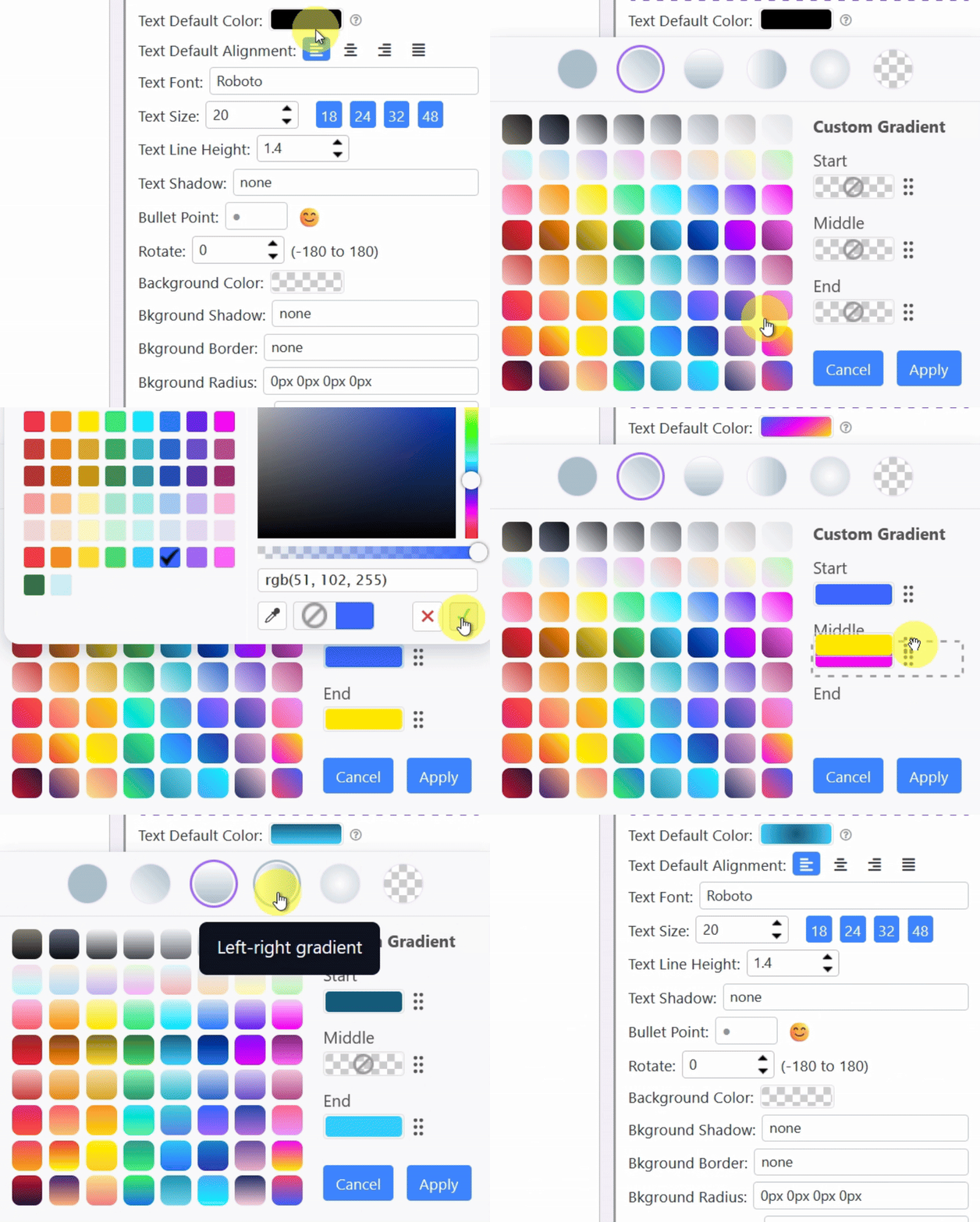
With just a few clicks, you can:
- Switch between solid colors and multiple gradient types
- Apply professional-looking gradients
For gradients, you can:
- Choose from preset gradient combinations
- Define your own custom gradient colors
- Swap color positions instantly
This new selector is designed to be faster, clearer, and far more flexible than before.
2) Apply Gradient Color to Any Text Selection
In the previous update, we introduced gradient colors for text elements, but that was still limiting.
You can now apply gradient color to any selected text, not just the entire text element. See the demo below:
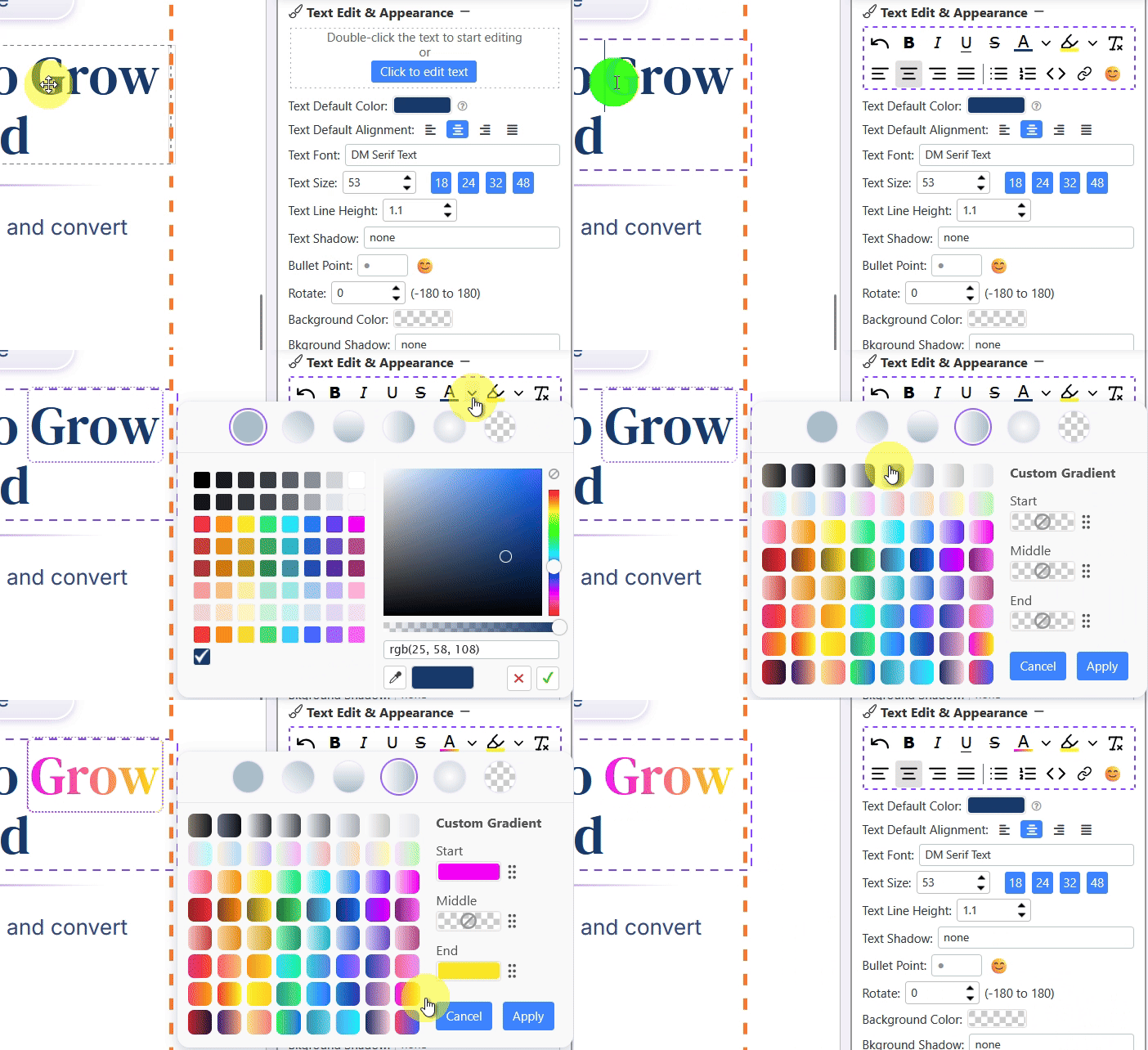
This means you can:
- Highlight key phrases within a headline or any text
- Create more dynamic, visually engaging copy
For example, you can now easily create headlines like this:

This gives you finer control over typography and opens up more creative design possibilities.
3) New FAQ Element
You’ve probably seen expandable FAQ sections like this:
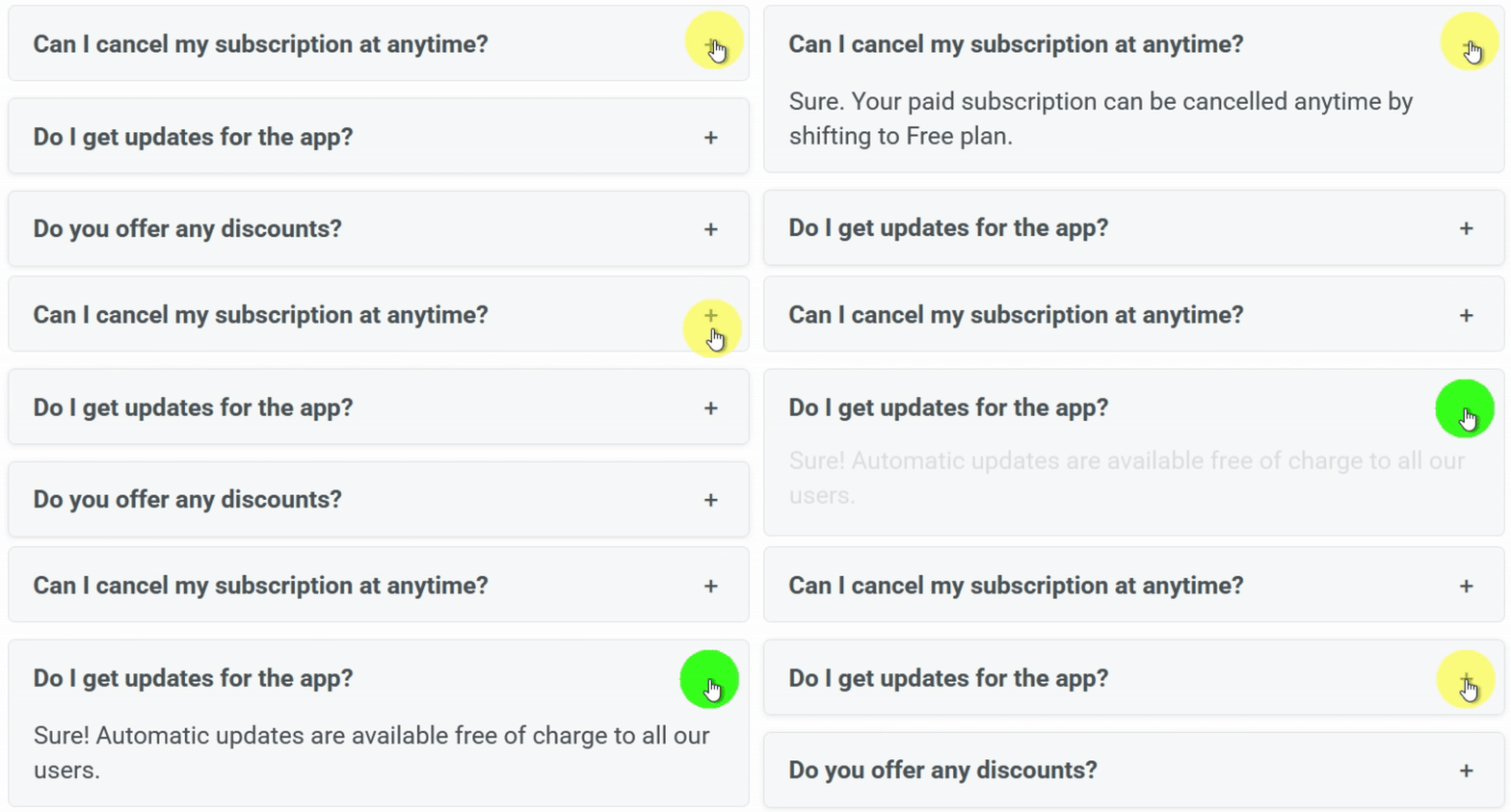
This has been a frequently requested feature. In the past, my answer was always:
“It’s not possible due to the architecture of the page builder.”
Fortunately, the architecture has evolved. Expandable content is now fully supported.
The new FAQ element allows you to:
- Organize common questions in a clean, expandable format
- Improve page readability and user experience
- Increase conversion rate with doubts being answered upfront
To add an FAQ element, simply hover over Add New Element to expand the options, then click this:

Note that you have to hover over to expand the options. It is hidden by default.
4) New Radio / Checkbox Input Element
Another element we’ve just added is the Radio / Checkbox Input Element.
Now, instead of just text inputs, you can add radio buttons and checkboxes to your page (or popup form).
This allows you to build survey-style pages, like this:
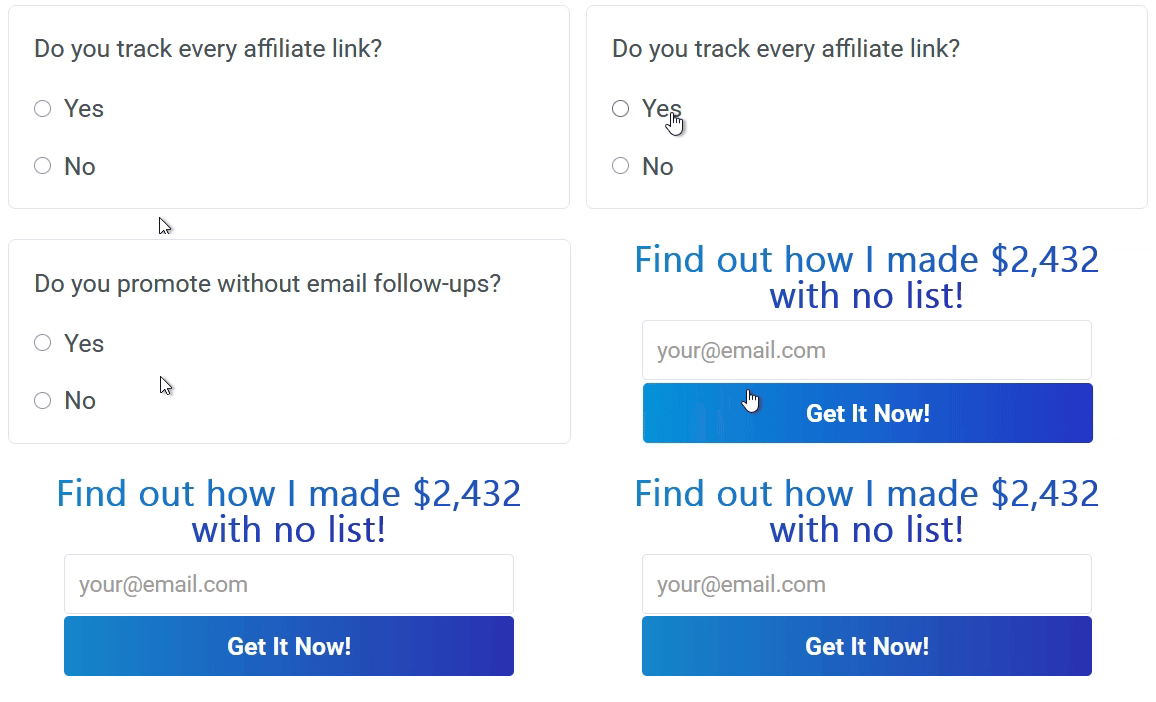
With this new element, you can:
- Create surveys with radio buttons or checkboxes
- Collect structured input from visitors
- Simulate a “survey-style” experience when needed
You can also choose whether the input should:
- Be submitted when the visitor opts in, or
- Function as a non-submitting (fake) survey for engagement
This gives you full control over both functionality and intent.
To add a radio/checkbox element, under Add New Element, click this:

5) Row Lock for Shared Pages
This feature was requested by Home Biz Joe, who asked:
Is there a way to create a page where, before I share the code, I lock one section so it can’t be changed? That way, anyone using the share code can edit everything else, but the locked section stays exactly as I set it?
The answer is now yes.
You can lock one or more rows before sharing a page, ensuring critical sections remain unchanged.
To lock a row:
- Mouse over the Row button
- Click the lock icon shown below
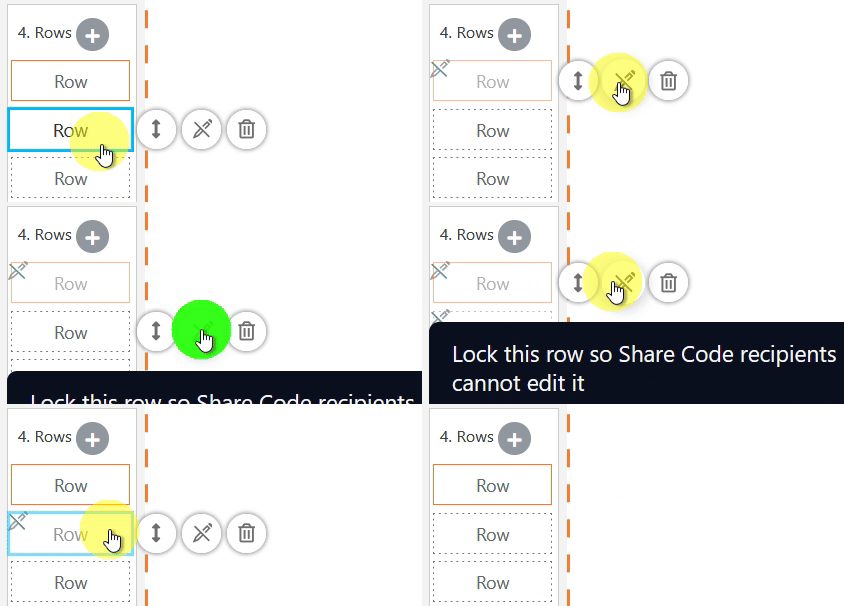
Click it again to unlock.
Once locked:
- Shared users cannot edit those rows
- All other rows remain fully editable
- No additional setup is required
This is especially useful for protecting headers, footers, disclaimers, or branded sections.
Other Improvements
In addition to these major updates, we’ve also made numerous minor improvements across existing features to make the Page Builder more intuitive, consistent, and user-friendly.
Many of these changes are subtle, but together they create a smoother and more efficient editing experience.
What’s Next?
We’re not done with the updates.
Our goal is to roll out new features early so advanced users can start benefiting from them right away.
Moving forward, we’ll be releasing more ready-made templates that demonstrate how to use these new features effectively, helping you move from idea to implementation even faster.
Thank you for your continued feedback and support.
More updates are on the way.
Stay tuned.
Hi Kenneth
Major updates rounds are really impressive. Round 3 makes a remarkable impact like gradient colour selector and applying to the text is very nice. FAQ element is a new kind of help whenever you want. Radio and checkbox elements are also very useful. Row lock was very much required as we can use this to lock certain things before sharing the page.
Nice and excellent is a small word for this kind of work and updates.
You have proved that you have always kept developing new requirements and providing to all user of leadsleap.
This is a marvelous updates that you have incorporated in the leadsleap system.
Kenneth keep working like this I am sure everyone loved this updates and me too.
Wonderful changes and god bless you.
Thank you Kenneth for all this
Keep it up
This is a great post.It is a New Year.Change is what keeps pushing Leadsleap ahead
Awesome addition to the Page Editor! Thanks for constantly improving the editor backend to ensure we can create better-looking pages. Much appreciated.
That’s fantastic, Kenneth. Thank you so much. Really great update and happy new year to you.
happy New Year to you and your family as well
Nice one, Kenneth! You continue to spoil us. Hope we have an awesome New Year!
Hi Kenneth
I am so impressed and happy with this new update mate.
These are the reasons I always tell my subscribers that Leadsleap is my #1 tool I use to build my online business. Simply unbeatable and proud to referr others to try as I know the quality and AWESOME value is here.
Great job and thanks for keeping making things better!
Alvaro
Great new features! Thanks a lot.
Great new features —
Thank you
Hi Kenneth, wishing you and your family good Health, Wealth, Love and a Happy 2026 💥 the major page builder update 3 looks really cool, very exciting look forward to using it 😊
Brilliant – and thank you, Kenneth. Just about everything I do revolves around LeadsLeap.
These features added to the page builder are great.
I just created a new page yesterday and saw these elements added.
LeadsLeap is the best!
Thank you so much, Kenneth.
Happy New Year Kenneth .. wish you and your loved ones health and happiness. Thank you for these amazing updates. I love them. 😎👍
These are all excellent additional features that I am sure will benefit a lot of members, great job Kenneth and happy new year to you. Getting the balance right between powerful new features and ease of use is tricky, but I think you have nailed it yet again :-)
Happy New Years Kenneth,
New Year, New Page Builder Updates
Looking forward to using the
New Gradient Color Selector,
Applying Gradient Color to Any Text Selection
New FAQ Element, New Radio / Checkbox Input Element,
and Row Lock for Shared Pages.
Thanks for all the updates and all you do for
the community:).
Awesome!
There’s an old adage that says “If it ain’t broke, don’t fix it.” I’m having some real difficulty simply changing backgrounds. Some features on the text toolbar are now non-functional. Also, I noticed text colors can change on their own after saving and closing the editor. Simply bolding text has become an adventure. When changing text, overlaps can occur if you simply paste over existing text. You must delete the original text first. The upgrades are nice but functionality is suffering. Overall, the old version was easier to use and more to my liking.
Sorry for the poor experience. I have sent you a support ticket. Let’s work together to fix all the issues.
Yet another set of great new features!
It’s time for me to go over my pages and update them with any or all of the new additions.
Thank you Kenneth.
Love all the updates — especially #5. That one really stood out. Appreciate you taking the time to work with us one-on-one, it honestly makes a big difference.
Great
These additions are great Kenneth. Thankyou
Great customer support, thanks!
WOW! Really love the gradient option
Hey, this is Steven. Everything just sounds great, I like the color graph it is awesome, I am a painter so I am in to the “palate” thing. I’m sure it will work great for a lot of ideas. Thanks guys,
Steven