The wait is over. Round 2 of our Page Builder updates is here, packed with powerful new features that make your design workflow faster, smarter, and more fun.
Let’s dive right in
1) Fancy Icon
Previously, the Icon Element was limited to basic web icons like gears and lightbulbs.

Now, we’ve added a full set of annotation graphics such as:
- circles,
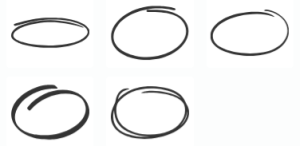
- underlines,

- arrows,

- highlights,

- and social media icons

Why icon? Why not image?
We used to offer these annotations as images, but images have one major drawback – you can’t change their color.
With the annotations now in SVG icon format, you can apply any color to match your theme perfectly.
But that’s not all!
You can even set color gradients, like the examples below:

And with the new onclick options (see update #5 below), Icon Elements are now more powerful than ever!
2) Table Element
We’ve deprecated the Divider Element because it is redundant. You can easily make one using the Background Element.
At the same time, we’ve introduced a Table Element.

The new Table Element let you quickly create simple table-like layouts like these:
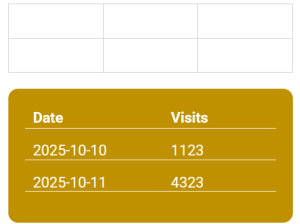
Note: These are visual tables, not data tables. To add content, you have to insert Text or Image Elements over the Table Element. Like other elements, you are free to overlap, position, and style them freely.
3) Padding Setting
We’ve added Padding option to the Editor of Text, Textlink, Icon, Table and Button Elements.
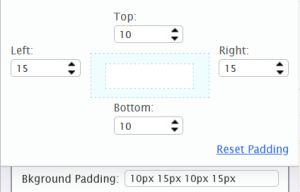
Padding gives you control over the inner spacing between content and borders.
To illustrate its benefit, previously, if you create a Text with background color, it may look like this:

You can see that the text is not really centered vertically.
With the padding option, you can now increase the bottom padding and make the same Text look like this:

4) Image Crop
This was a member’s feature request. Honestly, I thought it wasn’t possible… until inspiration struck!
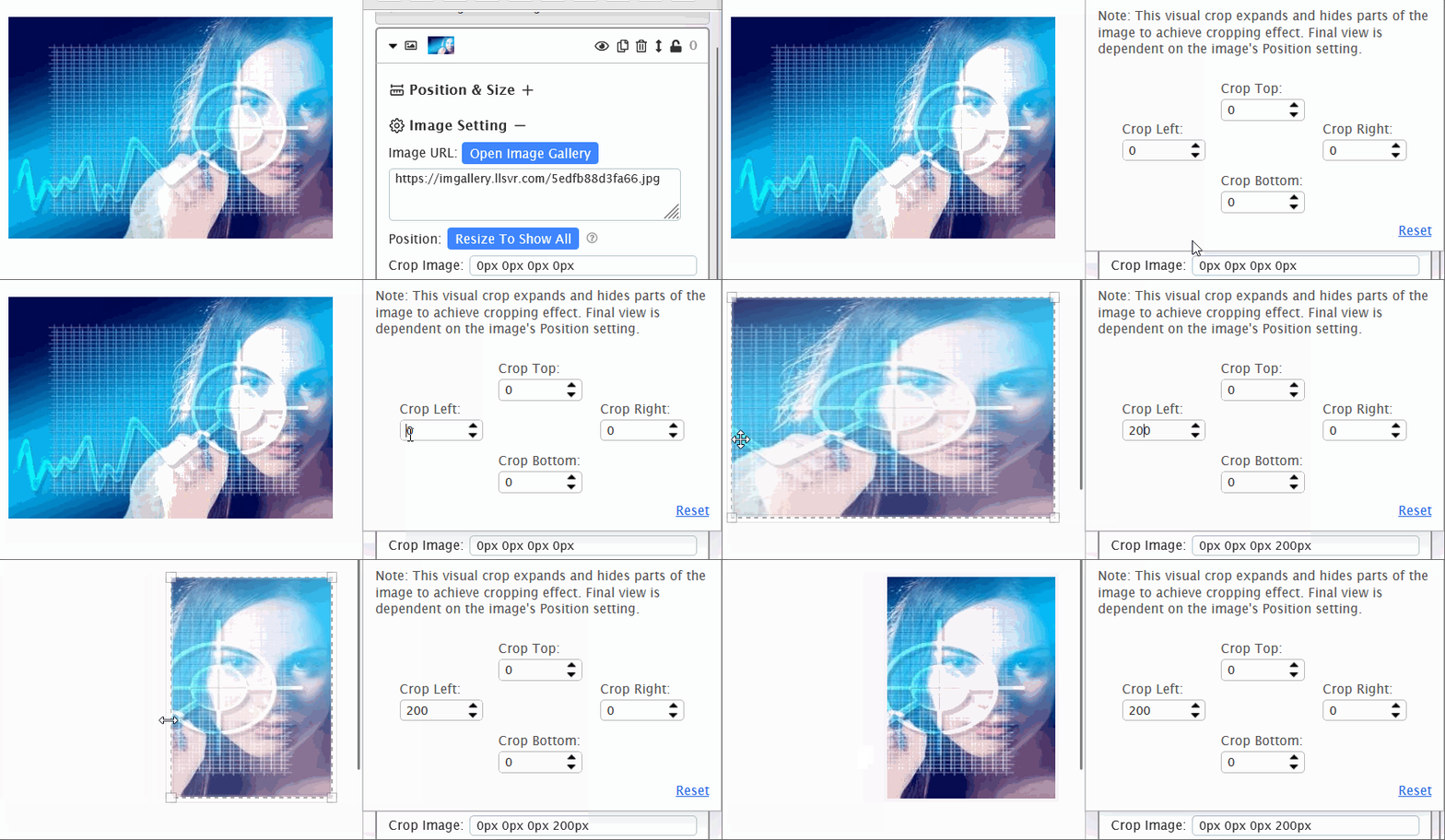
You can now crop images directly inside the Page Builder.
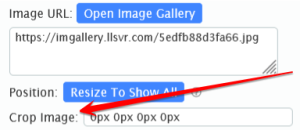
That means no more switching to external software or saving multiple cropped versions. Quick, simple, and efficient.
To be clear: this isn’t a true crop.
The builder basically expands the image and hides the overflow. The end result is a visual crop without changing the original image.
In the demo below, you’ll see how it works: first hide the unwanted part, then resize the image to achieve your desired look.
5) Advanced Onclick Options
This one is big.
The On Click actions menu has been expanded with several powerful new options:
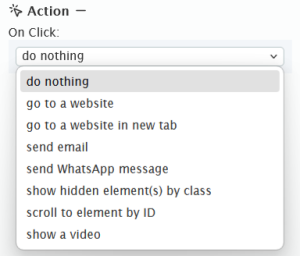
The newly added options are:
- Send Email
- Send WhatsApp Message
- Show hidden element(s) by class
- Scroll to element by ID
The first two, ‘Send email‘ and ‘Send WhatsApp Message‘, are straightforward. Visitors can now email or WhatsApp you with a click.
The last two open up a world of interactivity.
You can now:
- Create a dropdown navigation that reveals links on click and scrolls to sections.
- Build an FAQ accordion that show answers in a popup when clicked.
I’ll write a separate blog post explaining how to use “Show hidden element(s)” and “Scroll to element” soon. But if you already know your way around Class and ID, you can start experimenting right away.
That’s a wrap for Round 2!
Try these updates out and share your thoughts in the comments below.
Thank you! Awesome updates! The icons and image crop will save a lot of time.
I am reading this new updates and I can’t wait to use them since I use leadsleap everyday, but what I really want to try is the icon elements
Kenneth will always amaze me. He never stops improving the platform. I find it sometimes difficult to convince my prospects to join LeadsLeap because they can’t believe how much they will get for free, or even better with the Pro option. But once they decide to join, they never leave.
Thanks Kenneth ⭐⭐⭐⭐⭐
LeadsLeap is always at the forefront.
I’m proud to be a customer.
Of a truth Leadsleap is always ahead.
Good leadsleap
Kenneth, thank you. Excellent enhancements. I am CDO when it comes to web design, so I will use these features.
Note: CDO is like OCD .. only the letters are Alphabetical the way they are suppose to be. 🤣
Great update! Thanks, Kenneth!
great stuff again! LL is the best! thanks!
These are the updates we’ve been needing for years! Thank you
This is great news! I am looking forward to
using the Advanced Onclick Options. Thank
you sooo much Kenneth, these updates are
awesome:)
With LeadsLeap getting better and better every day, there’s no way I will ever stop being a satisfied user. Thank you Kenneth :-)
Hey thanks for always updating with simple ways to understand this system,,I am truly grateful
WOW! Thank you! This is an amazing update thank you!!
Thank you for the amazing update
The best I have seen. It is an amazing update. Thank you for sharing this amazing opportunity.
Thank you for the updates
Great stuff, i am fairly new to the community but will never leave, Kenneth when do you sleep or take time off, you just keep on improving the platform. Thank you
Haha, I still sleep. I just play less, or should I say, LeadsLeap is my playground.
Great updates! People on the outside don’t realise what a deep and powerful platform LeadsLeap is. Thanks Kenneth.
This platform is the most dynamic one I have ever used in my life! Not only is every support ticket resolved on the same day, but even one of my suggestions was recently implemented. Thank you Kennets!
Thank you for the information.
I’ll be checking things out soon enough.
I just got my first Paypal payment as a free member and very very limited time.
Before I pulled out the payment I decided to go ahead and upgrade to PRO first.
Now I’ll work with more focus knowing that opening email is only one way to build with this platform.
Thank you for the opportunity and an awesome platform for small business and big brands alike.
RitaAnn~